

Running phishing simulations for a single-language workforce is straightforward enough. But the moment your organization spans five countries, three alphabets, and a dozen regional email conventions, the complexity multiplies. Tools for creating and managing multi-language phishing simulation campaigns let you test employees in the language, tone, and cultural context that real attackers would use against them. Without that realism, your simulations train people to spot only English-language lures — while adversaries craft pitch-perfect pretexts in German, Japanese, or Portuguese. This article walks you through selecting the right platform, building localized phishing templates, running campaigns at global scale, and measuring results so your multilingual security training actually changes behavior. You will also find a reusable decision matrix for comparing platforms and a list of mistakes that quietly undermine international programs.
What Is Multi-Language Phishing Simulation?
Multi-language phishing simulation is the practice of sending controlled, realistic phishing emails to employees in their primary working language — complete with regionally appropriate sender names, pretexts, formatting, and landing pages. The goal is to measure and improve human resilience against social engineering across every locale your organization operates in.
MITRE ATT&CK documents phishing as technique T1566, with sub-techniques for spearphishing attachments (T1566.001), links (T1566.002), and service-based delivery (T1566.003) [1]. Real adversaries already localize: a credential-harvesting email targeting a French finance team will reference French tax deadlines, use a .fr sender domain, and format currency with commas — not periods. If your simulation program sends only English templates, you are testing an unrealistic scenario.
Why It Matters for Global Security Awareness
NIST SP 800-50 Rev. 1 frames security awareness as a continuous learning program, emphasizing that content must be relevant to the learner's role and context [2]. Language is one of the strongest context signals. An employee who receives training and simulations in their native language processes risk cues faster and retains lessons longer.
In practice, this means a phishing simulation in Slovak that mimics a local bank notification teaches a Bratislava-based analyst far more than a generic English "Your account has been suspended" template.
The NIST Cybersecurity Framework (CSF) 2.0 places awareness and training under the Protect function, category PR.AT [3]. NIS 2 Directive Article 21(2)(i) requires measures covering human resources security [4]. Both frameworks expect organizations to demonstrate that awareness activities reach the workforce effectively — which, for multinational entities, inherently means reaching them in their languages.
How to Build a Multi-Language Phishing Program Step by Step
Prerequisites
Before selecting a platform, document these inputs:
| Input | What to capture |
|---|---|
| Locale inventory | Every country, language, and regional variant (e.g., pt-BR vs. pt-PT) your workforce uses |
| HR data feed | Employee preferred language, office location, department, manager — needed for campaign targeting |
| Mail infrastructure | Relay/gateway allow-listing requirements per region; SPF/DKIM alignment for simulation sender domains |
| Legal review | Works-council or labor-law restrictions on employee monitoring in each jurisdiction (especially DE, FR, AT) |
| Baseline metrics | Current click rate, report rate, and training-completion rate per locale — even if estimated |
Step 1: Define Campaign Scope and Locale Groups
Group your workforce by language and region. A single "Spanish" group rarely works — pretexts that resonate in Mexico City fall flat in Madrid. Create locale groups such as es-MX, es-ES, de-DE, de-AT, and assign each group a cultural reviewer: someone who lives in that locale and can validate that the pretext, sender name, and call to action feel authentic.
Step 2: Select a Platform with the Right Phishing Platform Features
Use the decision matrix below (Section "Tools Comparison") to evaluate candidates. The non-negotiable phishing platform features for multilingual programs include: native support for Unicode and right-to-left (RTL) scripts, per-locale template libraries, locale-aware landing pages, SCIM or HR-feed integration for automatic locale assignment, and reporting that can segment results by language and region — not only by department.
Step 3: Build and Validate Localized Phishing Templates
Start with a base scenario — for example, a package-delivery notification — then localize it per locale group. Localization is not translation. Each localized phishing template must adapt:
- Sender display name and domain to a regionally plausible brand
- Date format, currency symbol, and number formatting
- Greeting conventions (formal "Sie" vs. informal "du" in German)
- Call-to-action phrasing that matches local service patterns
- Visual branding (logo, color, layout) of the impersonated service
Have the cultural reviewer sign off before launch. A poorly localized template trains employees to spot simulation emails — not real threats.
Step 4: Configure Delivery and Allow-Listing
Simulation emails must reach the inbox, not the spam folder. Work with each region's mail-gateway team to allow-list the simulation platform's sending IPs and envelope-sender domains. Verify SPF and DKIM alignment for every simulation sender domain so gateways do not quarantine the messages.
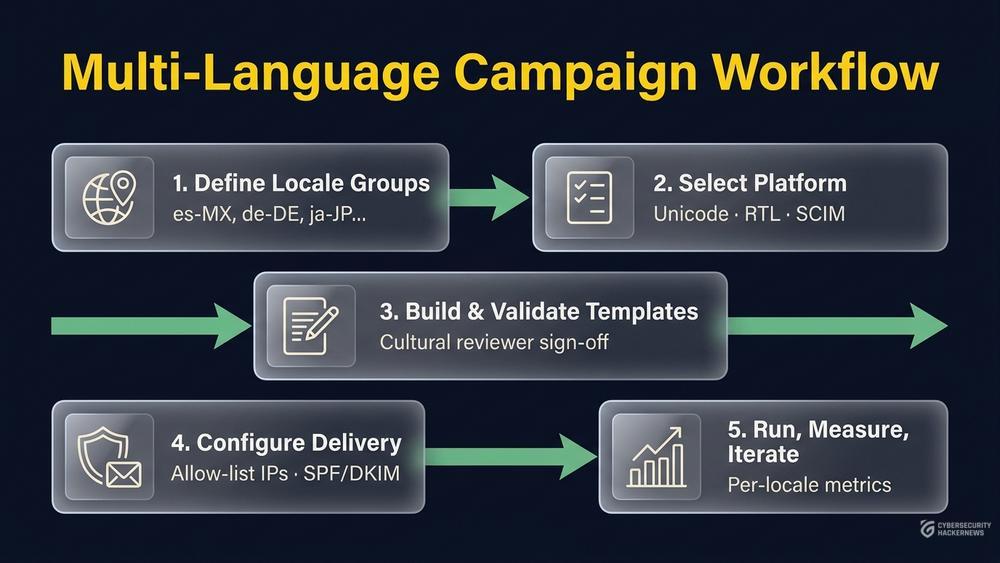
Step 5: Run, Measure, and Iterate
Launch campaigns in waves — one locale group at a time in the first round, so you can catch delivery or rendering issues before scaling. Track these metrics per locale:
| Metric | What it tells you |
|---|---|
| Click rate | Susceptibility to the pretext in that locale |
| Report rate | Whether employees use the phishing-report button instead of ignoring or deleting |
| Time-to-click | How quickly users interact — faster clicks suggest lower scrutiny |
| Training completion | Post-click training uptake per locale |
| Repeat-clicker rate | Employees who click in consecutive campaigns — highest-risk group |
After each campaign, feed results back into locale-specific training. CIS Controls v8.1 Control 14 (Security Awareness and Skills Training) calls for role-based content that is updated based on measurable outcomes [5]. Your per-locale metrics are exactly those outcomes.
In practice, this means if your de-DE group shows a report rate below your target while es-MX exceeds it, you invest more in German-language reporter training — not a blanket retraining for the entire company.
Best Practices
Rotate pretext categories across locales. If every locale receives a "password reset" lure in Q1, employees share warnings across offices and click rates drop artificially. Stagger categories: delivery notification for de-DE, HR policy update for es-MX, invoice approval for ja-JP — then rotate next quarter.
Treat the report button as the primary success metric. Click rate gets attention, but report rate measures the behavior you actually want: employees flagging suspicious email so your Security Operations Center (SOC) can investigate. Configure every locale's post-click landing page to reinforce reporting, not just display a "you failed" message.
Automate locale assignment from HR data. Manual tagging drifts within weeks as people transfer or join. Connect your simulation platform to your Identity Provider (IdP) or Human Resources Information System (HRIS) via SCIM, and map the preferred-language attribute to the platform's locale field.
Run campaigns on realistic schedules for each time zone. A "9 AM Monday" send in UTC means your Tokyo office receives it at 6 PM — after most staff have left. Schedule per locale to match peak email-processing hours.
Align difficulty to maturity. Start new locale groups with moderate-difficulty lures (generic brand, obvious urgency cues). Increase difficulty only after the group demonstrates improving report rates over two or more campaigns.
Tools Comparison
Decision Matrix: Selecting a Multi-Language Phishing Platform
Use this matrix to score each candidate platform on a 1–3 scale (1 = absent/weak, 2 = partial, 3 = strong). Weight each criterion by your organization's priorities and sum the weighted scores. The platform with the highest total is your shortlist leader; validate with a proof-of-concept before procurement.
| Criterion | Weight (adjust to your priorities) | Candidate A | Candidate B | Candidate C |
|---|---|---|---|---|
| Number of supported languages and RTL/CJK rendering | High | score | score | score |
| Pre-built localized phishing templates per locale | High | score | score | score |
| Template editor with Unicode, RTL, and locale preview | High | score | score | score |
| SCIM / HRIS integration for auto locale assignment | Medium | score | score | score |
| Reporting segmented by language, region, department | High | score | score | score |
| Locale-aware landing pages and training modules | Medium | score | score | score |
| API for campaign automation and SIEM integration | Medium | score | score | score |
| GDPR and works-council compliance features (consent logging, data residency) | High (EU orgs) | score | score | score |
| Pricing model (per-user, flat, per-campaign) | Medium | score | score | score |
| Vendor support in your operational languages | Low–Medium | score | score | score |
Real platforms to evaluate include KnowBe4, Proofpoint Security Awareness (formerly Wombat), Cofense PhishMe, Hoxhunt, Microsoft Attack Simulation Training (part of Microsoft Defender for Office 365), Barracuda PhishLine, and Gophish (open-source, self-hosted). Each offers different depth of locale support, so request a demo with your specific language list and a sample RTL or CJK template before committing.
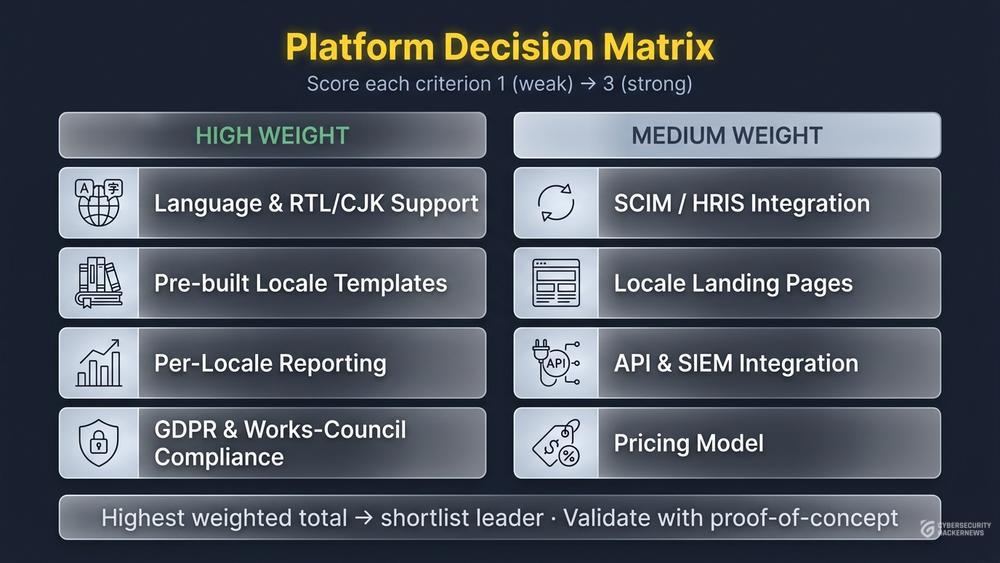
To adapt this matrix: replace the generic column headers with your actual shortlisted platforms, adjust the weight column to reflect whether you operate primarily in the EU (raise GDPR weight), in CJK markets (raise RTL/CJK weight), or in a single region with many languages (raise template-library weight). Then have two independent evaluators score each cell during the proof-of-concept to reduce bias.
Real-World Example (Illustrative Scenario)
⚠️ Disclaimer: The following scenario is an illustrative example based on typical industry patterns. The specific metrics are hypothetical estimates designed to demonstrate realistic outcomes, not measured data from a documented project. They should not be cited as factual benchmarks.
Context: A European financial services firm with offices in Germany, France, Slovakia, and the UK runs a security-awareness program. The workforce of roughly 4,000 employees operates in four primary languages. The existing phishing simulation program uses English-only templates for the entire organization.
Challenge: Click rates in non-English-speaking offices are unusually low — not because employees are resilient, but because they recognize the English templates as internal tests (the firm's business communication in those offices is conducted in the local language). Meanwhile, the SOC receives almost no phishing reports from those offices, suggesting employees are not engaging with the simulations or the report button at all. The firm needs a phishing simulation international program that generates realistic data and actually changes behavior.
Solution: The security team selects a platform supporting all four languages and deploys the program in phases:
- They build localized phishing templates for each locale using real regional pretexts (German tax office, French delivery service, Slovak telecom provider, UK Royal Mail).
- HR data feeds auto-assign each employee to the correct locale group via SCIM.
- Campaigns run on locale-appropriate schedules, with difficulty calibrated to each group's baseline.
- Post-click training is delivered in the employee's language, reinforcing the phishing-report workflow.
- After three quarterly cycles, the team reviews per-locale metrics to identify persistent high-risk groups.
Results (illustrative estimates):
- Overall phishing report rate increases from an estimated baseline to roughly 55% across all locales (illustrative)
- Click rate for non-English offices decreases by approximately 60% compared to the pre-localization baseline (illustrative)
- Repeat-clicker population shrinks by roughly 70% after three campaign cycles (illustrative)
- SOC receives actionable phishing reports from offices that previously generated near-zero reports (illustrative)
Key Takeaways: Localization transforms a checkbox exercise into a realistic test. Measuring report rate — not only click rate — reveals whether employees are building the right habit. Automating locale assignment prevents data drift and ensures new hires are included from day one.
Common Pitfalls
1. Translating templates instead of localizing them. Machine-translating an English "Your Netflix account is suspended" email into Japanese produces a grammatically correct but culturally implausible message. Japanese phishing lures typically impersonate domestic services like Rakuten or Japan Post. Translation without cultural adaptation creates simulations employees dismiss instantly, generating artificially low click rates that mask real risk.
2. Ignoring legal and labor-law constraints per jurisdiction. In Germany and Austria, works councils (Betriebsrat) may require formal consultation or approval before employee-monitoring activities, including phishing simulations. France has similar requirements under CNIL guidance. Launching a global phishing campaign software rollout without legal review per country can result in program suspension, fines, or employee-relations damage.
3. Treating click rate as the only success metric. A locale group with a low click rate and a near-zero report rate is not "secure" — it is disengaged. If employees delete suspicious email without reporting, the SOC never learns about real threats. Overweighting click rate leads teams to celebrate the wrong outcome.
4. Running identical campaigns across all locales simultaneously. When employees in Frankfurt and Paris receive the same campaign theme on the same day, cross-office chat ("Did you get that weird DHL email?") inflates report rates and suppresses clicks. Stagger campaigns by at least one week across locales.
5. Skipping the cultural-reviewer step. A simulation email that uses an informal greeting ("Salut!") in a French corporate environment that defaults to formal address ("Bonjour Madame/Monsieur") signals inauthenticity immediately. Without a native reviewer, subtle errors accumulate and employees learn to recognize simulations rather than real threats.
6. Failing to re-baseline after localization. Your pre-localization metrics are not comparable to post-localization metrics. The first localized campaign is your new baseline; trending improvements against the old English-only numbers overstates progress.
Next Steps
-
Inventory your locales this week. Pull your HR data, list every language and regional variant your workforce uses, and identify locale groups that currently receive no localized simulations.
-
Run a proof-of-concept with two locale groups. Pick one well-served locale (likely English) and one underserved locale. Build one localized phishing template for each, send them, and compare click rates, report rates, and time-to-click. This data justifies budget for a full platform.
-
Score three candidate platforms using the decision matrix. Fill in the matrix from the Tools Comparison section with two independent evaluators during vendor demos. Weight the criteria for your regulatory and linguistic environment before scoring.
-
Appoint cultural reviewers for each locale group. Identify one native speaker per locale who will validate every template before it launches. Add their review as a gate in your campaign-launch checklist.
-
Set a reporting-rate target, not just a click-rate target. Define a per-locale report-rate goal and track it quarterly. Report rate is the metric that translates directly into SOC visibility and organizational resilience.
Sources
[1] MITRE, "MITRE ATT&CK," The MITRE Corporation. [Online]. Available: https://attack.mitre.org/
[2] NIST, "Building a Cybersecurity and Privacy Learning Program," NIST Special Publication 800-50 Rev. 1, National Institute of Standards and Technology, 2024. [Online]. Available: https://csrc.nist.gov/pubs/sp/800/50/r1/final
[3] NIST, "The NIST Cybersecurity Framework (CSF) 2.0," NIST Cybersecurity White Paper 29, National Institute of Standards and Technology, 2024. [Online]. Available: https://csrc.nist.gov/pubs/cswp/29/the-nist-cybersecurity-framework-csf-20/final
[4] European Parliament and Council, "Directive (EU) 2022/2555 on measures for a high common level of cybersecurity across the Union (NIS 2 Directive)," 2022. [Online]. Available: https://eur-lex.europa.eu/eli/dir/2022/2555/oj
[5] Center for Internet Security, "CIS Critical Security Controls Version 8.1," 2024. [Online]. Available: https://www.cisecurity.org/controls/v8-1
[6] European Parliament and Council, "Regulation (EU) 2016/679 — General Data Protection Regulation," 2016. [Online]. Available: https://eur-lex.europa.eu/eli/reg/2016/679/oj