

Phishing remains one of the prime threats facing organizations, with ENISA classifying it among the top categories in its threat landscape analysis [1]. Building YARA rules for detecting phishing email campaigns gives your security team a pattern-matching engine that catches what signature-based gateways miss. This approach turns threat intelligence into executable detection logic you can version-control, peer-review, and deploy across your email pipeline. In this article, you will learn how to write, test, and operationalize YARA rules that target real phishing patterns. Whether you run a SOC, lead an incident response team, or are building your first detection rule, you will walk away with a reusable workflow for email threat detection.
Table of Contents
- What Is YARA for Email Analysis?
- Why Phishing Signature Rules Matter for Security Teams
- How to Build YARA Rules for Malicious Email Detection Step by Step
- Template: Phishing YARA Rule Skeleton
- Best Practices
- Tools Comparison
- Real-World Example (Illustrative Scenario)
- Common Pitfalls in Email Threat Detection
- FAQ
- Next Steps
What Is YARA for Email Analysis?
YARA is a pattern-matching tool originally designed for malware research. You write rules that describe text strings, byte patterns, or conditions, and YARA scans files to report matches. When applied to email security, YARA rules inspect message bodies, headers, and MIME-decoded attachments for indicators that characterize phishing campaigns.
In practice, this means you feed raw .eml files or extracted attachments into YARA, and it tells you which rules matched — functioning as a lightweight, customizable classification layer between your mail gateway and your analyst queue.
MITRE ATT&CK catalogues phishing under technique T1566 (Phishing), with sub-techniques T1566.001 (Spearphishing Attachment) and T1566.002 (Spearphishing Link) [2]. Your YARA rules map directly to these sub-techniques: one set targets attachment-borne payloads, another targets URL patterns in message bodies.
Why Phishing Signature Rules Matter for Security Teams
Commercial email gateways rely on vendor-curated signatures and reputation feeds. When a new campaign launches — often using fresh domains and polymorphic lure documents — there is a detection gap until the vendor updates. Custom phishing signature rules close that gap because you write detection logic from your own threat intelligence within hours, sometimes minutes.
CIS Controls v8.1 reinforces this approach: Control 9 (Email and Web Browser Protections) calls for technical controls on email security, while Control 13 (Network Monitoring and Defense) calls for operating processes to detect threats through monitoring and analysis [3]. YARA-based email scanning satisfies both by providing an automated, auditable detection mechanism.
How to Build YARA Rules for Malicious Email Detection Step by Step
Prerequisites and Setup
You need three things before writing your first rule:
| Component | Purpose | Where to get it |
|---|---|---|
YARA compiler (yarac) |
Validates and compiles rules | Official YARA documentation on GitHub |
| Sample corpus | Benign and malicious .eml files for testing |
Your quarantine, abuse mailbox, or public phishing feeds |
| Text editor with YARA syntax support | Highlights strings and conditions | VS Code with a YARA extension, or Vim with syntax files |
Install YARA following the project's official build instructions. Confirm the installation by compiling a minimal rule against a test file.
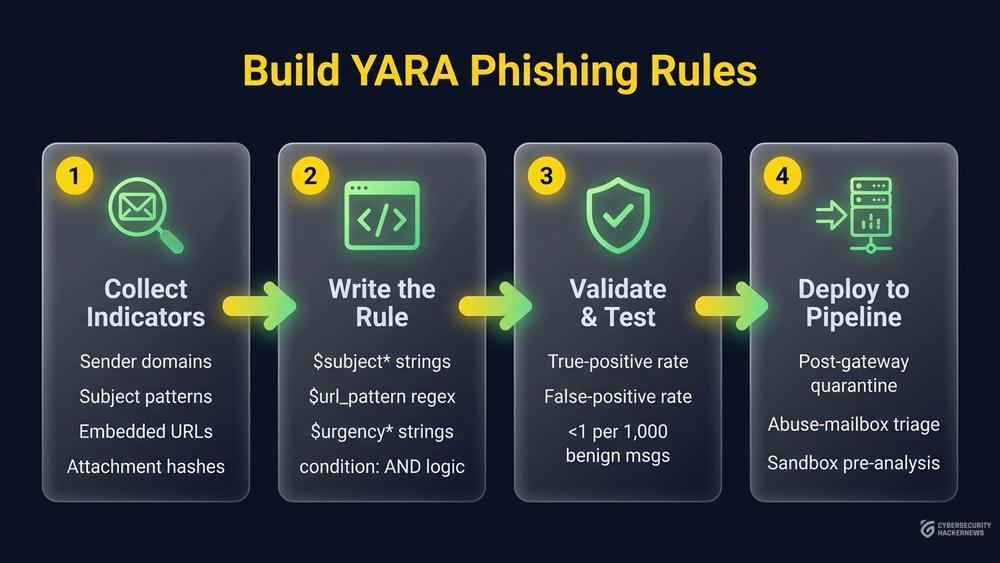
Step 1 — Collect Campaign Indicators
Pull indicators from your most recent phishing reports: sender domains, subject-line patterns, embedded URLs, attachment hashes, and distinctive HTML or macro fragments. Group them by campaign. A single campaign typically shares at least two to three stable textual indicators — these become your YARA strings.
Step 2 — Write the Detection Rule
Start with a focused rule that targets one campaign's characteristics. The rule below detects a credential-harvesting phishing lure that impersonates a document-sharing notification and includes a suspicious URL pattern:
rule Phishing_DocShare_Lure : phishing credential_harvest
{
    meta:
        author      = "SOC Team"
        description = "Detects credential-harvesting phishing lure impersonating document-sharing services"
        date        = "2025-06-15"
        reference   = "internal case #4812"
        mitre_att   = "T1566.002"

    strings:
        $subject1   = "You have a new shared document" ascii nocase
        $subject2   = "Action required: review document" ascii nocase
        $url_pattern = /https?:\/\/[a-z0-9\-]{4,30}\.(click|top|xyz|buzz)\/[a-z0-9]{8,}/ ascii nocase
        $urgency1   = "expires in 24 hours" ascii nocase
        $urgency2   = "immediate action required" ascii nocase
        $brand1     = "OneDrive" ascii nocase
        $brand2     = "SharePoint" ascii nocase

    condition:
        any of ($subject*) and
        $url_pattern and
        any of ($urgency*) and
        any of ($brand*)
}
This rule requires a match across four indicator categories — subject line, URL pattern, urgency language, and brand impersonation — which keeps false positives low while catching variations of the same campaign.
Step 3 — Validate and Test
Compile the rule to catch syntax errors, then scan your sample corpus. Measure two metrics:
| Metric | Target | How to measure |
|---|---|---|
| True-positive rate | Matches confirmed phishing samples from the target campaign | Scan your quarantine samples |
| False-positive rate | Fewer than one false hit per thousand benign messages | Scan a representative benign corpus |
Tune strings and conditions iteratively. Broadening a regex catches more variants but increases false-positive risk — this is the fundamental trade-off in phishing detection rule writing.
Step 4 — Deploy to Your Email Pipeline
Integrate YARA scanning at one or more points in your mail flow. Common integration points include the post-gateway quarantine inspection, the abuse-mailbox triage automation, and the attachment sandbox pre-analysis stage. Configure your SOAR or automation platform to call YARA against incoming .eml files and route matches to the analyst queue with the rule name and matched strings attached.
Template: Phishing YARA Rule Skeleton
Use this skeleton as a starting point for every new phishing campaign rule. Replace the placeholder values with your campaign-specific indicators, then compile and test before deployment.
| Field | Placeholder | Guidance |
|---|---|---|
rule name |
Phishing_<CampaignName>_<Variant> |
Use snake_case; include the campaign family name |
meta: author |
"Your Team Name" |
Identifies the rule owner for review cycles |
meta: mitre_att |
"T1566.001" or "T1566.002" |
Map to the correct ATT&CK sub-technique |
$subject* strings |
Campaign-specific subject lines | Use ascii nocase; add 2-3 variants |
$url_pattern |
Regex matching campaign domain pattern | Keep the TLD list short to limit false positives |
$payload* strings |
Macro keywords, JS snippets, or file magic bytes | Target the attachment type the campaign uses |
condition |
Combine categories with and |
Require matches from at least 3 indicator categories |
How to adapt it: Start by filling in the $subject* strings from your latest abuse-mailbox samples. Add the $url_pattern regex based on the domain registration pattern you observe. If the campaign uses attachments, add $payload* strings targeting macro calls or embedded scripts. Adjust the condition to require the combination that produces zero false positives against your benign corpus before promoting the rule to production.
Best Practices
Version-control your rules. Store YARA rules in a Git repository. Tag each rule with the campaign identifier, creation date, and the analyst who wrote it. Peer-review rule changes through pull requests — the same workflow you use for detection-as-code with Sigma rules.
Namespace by campaign family. Group rules into files by threat actor or campaign type. This makes bulk enable/disable straightforward when a campaign goes dormant.
Set metadata fields consistently. Include author, description, date, reference, and mitre_att in the meta section of every rule. This metadata feeds your detection coverage dashboard and supports the CSF 2.0 category DE.AE (Adverse Event Analysis) by linking detections to adversary techniques [4].
Combine YARA with header analysis. YARA excels at content matching but does not natively parse SMTP headers. Pair it with SPF, DKIM, and DMARC validation in your mail pipeline so authentication failures and content matches reinforce each other.
Schedule rule reviews. Phishing campaigns evolve. Review your active rule set monthly. Archive rules that have not matched in 90 days — they add scanning overhead without detection value.
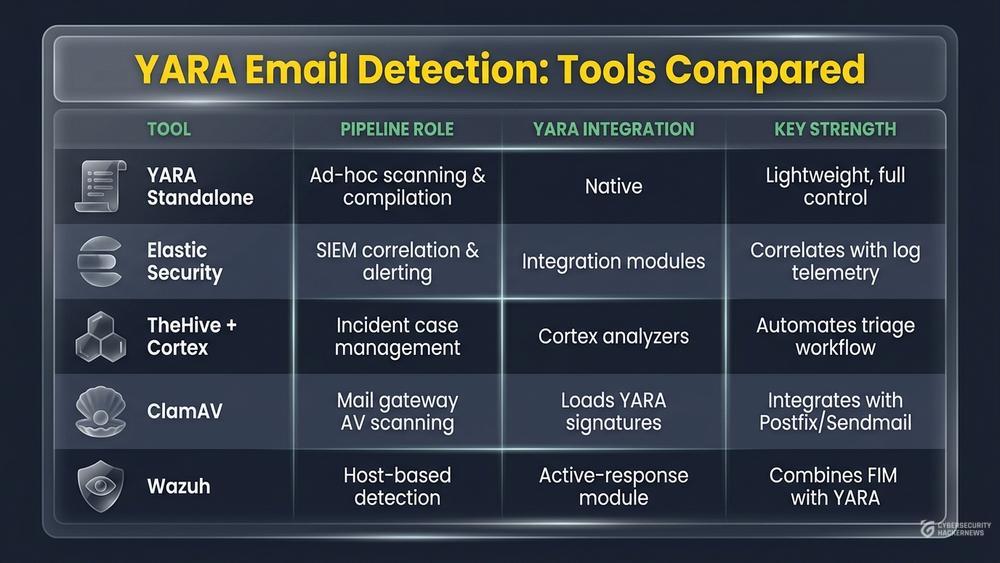
Tools Comparison
| Tool | Role in Email Pipeline | YARA Integration | Strengths |
|---|---|---|---|
| YARA (standalone) | Rule compilation, ad-hoc scanning | Native | Full control, scriptable, lightweight |
| Elastic Security | SIEM correlation, alert management | Supports YARA via integration modules | Correlates YARA matches with log telemetry |
| TheHive + Cortex | Incident response case management | Cortex analyzers call YARA on observables | Automates triage, links matches to cases |
| ClamAV | Mail gateway antivirus scanning | Loads YARA rules as a signature format | Integrates directly with MTAs (Postfix, Sendmail) |
| Wazuh | Host-based detection and response | Active-response module triggers YARA scans | Combines file-integrity monitoring with YARA |
In practice, this means most teams do not choose one tool exclusively. A typical deployment uses ClamAV or a commercial gateway for inline scanning and a SIEM such as Elastic Security for post-delivery correlation.
Real-World Example (Illustrative Scenario)
⚠️ Disclaimer: The following scenario is an illustrative example based on typical industry patterns. The specific metrics are hypothetical estimates designed to demonstrate realistic outcomes, not measured data from a documented project. They should not be cited as factual benchmarks.
Context: A mid-sized financial services firm with a five-person SOC receives approximately 200 user-reported phishing emails per week. Analysts manually inspect each report, averaging twelve minutes per message.
Challenge: A sustained credential-harvesting campaign impersonating the firm's document-sharing platform evaded the commercial email gateway for several days before analysts identified the pattern. Manual triage created a backlog that delayed response to other security events.
Solution: The SOC wrote three YARA rules targeting the campaign's subject-line patterns, URL structure, and HTML form elements. They integrated the rules into their abuse-mailbox automation using Cortex analyzers, enabling automatic classification of incoming reports. Rules were stored in Git with mandatory peer review.
Results (illustrative estimates):
- Automated pre-triage classification of phishing reports reduced manual analysis time by roughly 65% (illustrative)
- Mean time from campaign launch to first detection rule deployment dropped to under four hours (illustrative)
- False-positive rate held below one report per five hundred scanned messages (illustrative)
Key Takeaways: Writing targeted YARA rules and integrating them into an automated triage pipeline frees analyst capacity for higher-value investigation. Peer review and version control reduce the risk of deploying a rule that floods the queue with false positives.
Common Pitfalls in Email Threat Detection
1. Writing rules that are too broad. A rule matching a single common word like "invoice" without additional conditions triggers on legitimate business email. Require matches across multiple indicator categories in your condition block.
2. Neglecting case sensitivity. Phishing lures vary capitalization. Omitting nocase on string definitions causes missed detections on mixed-case variants like "URGENT: Review Document."
3. Skipping the benign corpus test. If you test only against known-malicious samples, you have no visibility into your false-positive rate. Scan at least a thousand representative benign messages before promoting a rule to production.
4. Ignoring rule maintenance. Deploying rules without a review cycle means your rule set accumulates stale entries. Stale rules increase scan time and can match on legitimate content that happens to reuse patterns from retired campaigns.
5. Hardcoding IOCs instead of patterns. Embedding a specific domain or hash catches exactly one variant. Prefer regex patterns that capture the campaign's domain-generation or URL structure logic — this detects the next wave, not just the current one.
6. Scanning only attachments. Many credential-harvesting campaigns carry no attachment. Their payload is a URL embedded in the HTML body. Ensure your pipeline scans the full .eml file, not just extracted attachments.
Next Steps
- Export your last ten confirmed phishing cases from your abuse mailbox and extract shared textual indicators (subject patterns, URL structures, HTML snippets).
- Write your first campaign-specific rule using the skeleton template above. Compile it, scan your benign corpus, and measure the false-positive rate.
- Integrate YARA scanning into your abuse-mailbox triage automation. Start with a "tag and alert" mode before enabling automated quarantine.
- Map your rules to MITRE ATT&CK sub-techniques T1566.001 and T1566.002 [2] and update your detection coverage dashboard.
- Schedule a monthly rule review — archive dormant rules, tune active ones against the latest campaign samples, and document changes in your Git repository.
Sources
[1] ENISA, "ENISA Threat Landscape 2025," European Union Agency for Cybersecurity, 2025. [Online]. Available: https://www.enisa.europa.eu/publications/enisa-threat-landscape-2025
[2] MITRE, "T1566 Phishing," MITRE ATT&CK. [Online]. Available: https://attack.mitre.org/
[3] Center for Internet Security, "CIS Critical Security Controls Version 8.1," 2024. [Online]. Available: https://www.cisecurity.org/controls/v8-1
[4] S. Rose, O. Borchert, S. Mitchell, and S. Connelly, "The NIST Cybersecurity Framework (CSF) 2.0," NIST CSWP 29, National Institute of Standards and Technology, 2024. [Online]. Available: https://csrc.nist.gov/pubs/cswp/29/the-nist-cybersecurity-framework-csf-20/final
[5] NIST, "Guide to Cyber Threat Information Sharing," NIST Special Publication 800-150, National Institute of Standards and Technology, 2016. [Online]. Available: https://csrc.nist.gov/pubs/sp/800/150/final